
Edit Cloudflare DNS records wherever you are.
Add, change and delete records in any zone, move whole zones in and out as BIND files, and see which names people look up. Email Routing and load balancing live here too.
plan Your records and zone settings are free to browse, read-only. Changing them takes Clouder Pro.


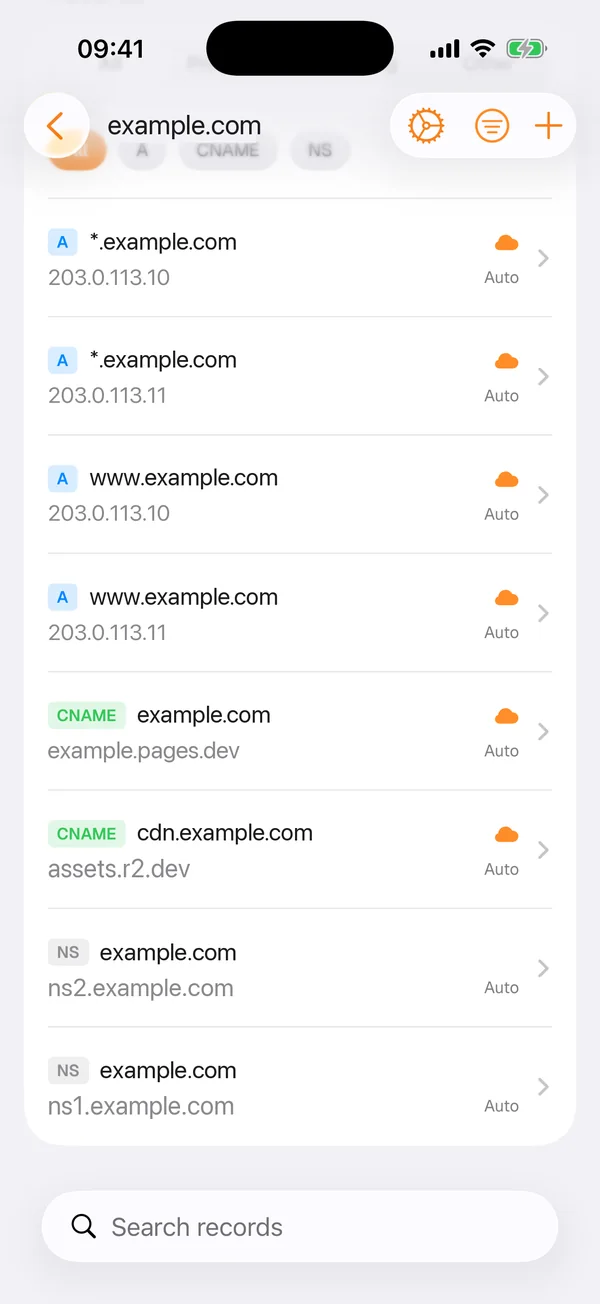
Records in every zone
Pick a zone and Clouder lists its records with their type, value, proxy status and TTL. Filter by record type or by proxy status, or search when a zone has hundreds of entries.
Open a record to change it, add a new one from the same screen, or delete one you no longer need. Long TXT values such as DKIM keys wrap while you edit them, so you can check every character before you save. Each save goes straight to the Cloudflare API from your device.
Zone files in and out
Export a zone as a standard BIND file to read it, copy it or share it with a colleague. Importing goes the other way: give Clouder a zone file and it adds the records in bulk. You can have imported records proxied on arrival, and records that already exist are reported rather than added twice.
;; Domain:     example.com.
;; Exported:   2026-10-03 09:41:00

;; A Records
*.example.com.	1	IN	A	203.0.113.10 ; cf_tags=cf-proxied:true
*.example.com.	1	IN	A	203.0.113.11 ; cf_tags=cf-proxied:true
www.example.com.	1	IN	A	203.0.113.10 ; cf_tags=cf-proxied:true
www.example.com.	1	IN	A	203.0.113.11 ; cf_tags=cf-proxied:true

;; CNAME Records
example.com.	1	IN	CNAME	example.pages.dev. ; cf_tags=cf-proxied:true
cdn.example.com.	1	IN	CNAME	assets.r2.dev. ; cf_tags=cf-proxied:true

;; NS Records
example.com.	86400	IN	NS	ns1.example.com.
example.com.	86400	IN	NS	ns2.example.com.
The exported zone file for example.com in BIND format, recreated from the app with the records shown above.
An export is also the simplest backup you can take before a bigger change. Keep it, and you can put the zone back the way it was.
DNS analytics
DNS analytics follow the queries Cloudflare answers for a zone over six hours, a day or a week. You get the total, a timeline, and the top query names, query types and response codes.
It is a quick way to confirm a change landed. If a new record name never shows up in the top queries, or NXDOMAIN answers jump after an edit, look for a typo in the name.
Email Routing, load balancing and health checks
- Email Routing
- Rules that forward addresses on your domain to an inbox you already use, with a catch-all address for everything else.
- Load balancing
- Origin pools and the health monitors that watch them. Load balancers and pools you no longer need can be deleted from the app.
- Health checks
- Whether your origin servers are answering, and why a check is failing. Create HTTP, HTTPS and TCP checks, and pause, edit or delete them. They need a Cloudflare Pro plan or higher on the zone.
Zone settings
Each zone's speed and network settings are here: Brotli, Rocket Loader, HTTP/3, IPv6, WebSockets, Always Online, and how long browsers keep your files. Settings your Cloudflare plan cannot change are marked as such, so a switch that will not move explains itself.
Whole domains can be removed from your phone as well. Clouder asks you to type the domain's name first, so it never happens by accident. Clouder Pro also covers Cloudflare Registrar and the Intel API.
Free and Pro
Free
- Every zone and its records, with filters and search
- Zone settings and the zone overview, read-only
- Basic traffic and request analytics
Clouder Pro
- Add, edit and delete records, and import zone files
- Change Email Routing, load balancers and health checks
- Change zone settings and remove domains
- Registrar and the Intel API
Before you save a change
DNS changes propagate globally, and undoing one can take time while resolvers still hold the old answer. A deleted A or AAAA record takes a site offline, and a wrong MX record stops email. Check the type and the value before you save, and export the zone first when you are about to change a lot of it.
With Pro, read-only mode stays on until you switch it off in settings. The production agreement covers DNS risks in more detail.
Try it on your own account.
Free on iPhone, iPad and Android. Not affiliated with Cloudflare, Inc.